


Vanguard Dynamics – VailCast
Jun
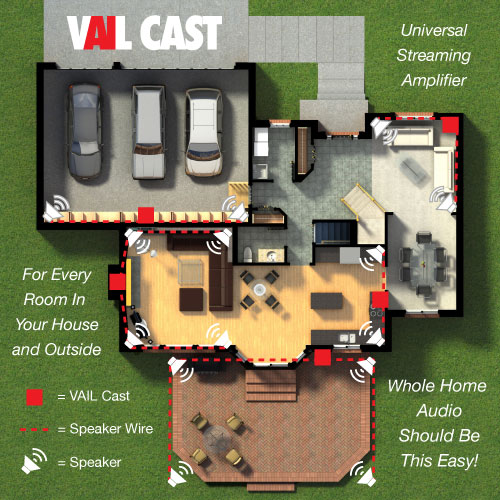
The VAIL CAST is a compact universal streaming amplifier that brings the best audio experience for single-zone or whole-home audio.
Whether you want to stream from your favourite services, including Apple Airplay 2, Google Assistant, Chromecast Built-In, Amazon Alexa, or any other streaming music service the VAIL (Voice Artificial Intelligence Link) Cast connects you while amplifying your speakers. It fits inside a standard double gang bracket with the optional wall mount bracket or on your countertop, desk, or mantle.
Here are a few considerations/features of the product.
Due to their experience with complex control systems and IT devices, many integrators overthink the network needs and setup of the VAIL Cast. It is a very simple IOT device and there are no special considerations needed outside of the ordinary ones of reliable connectivity.
When mounting into the wall. VAIL Cast is designed to operate coolly within a standard drywall stud bay. If you will be placing it into another setting, such as a brick or cement wall, it must have some form of ventilation or a large area behind it. In many installations, it is convenient to locate the VAIL Cast behind a TV. If you do this, you can remove the knockout at the bottom and route cables through it. These may include the optical, IR receiver, and power. If connecting to a TV and needing to control volume via the VAIL Cast, you will need to connect and find a location for the included IR receiver.
If the user(s) will frequently use Bluetooth pairing, you may want to place it in an accessible location as it must be prompted into pairing mode via front-mounted controls. It only needs to be paired once with a device. Outdoor zones can be done by placing VAIL Cast indoors and running the speaker cable outside. Control can be done by using a smartphone outside.
You can remotely locate the power supply up to 300 feet away using wire gauge 18 AWG or larger.
Each VAIL Cast can handle up to 2 pairs of speakers. There is a switch on the back of the VAIL Cast for selecting 4 or 8 ohms. If you wish to power more speakers, you can use the audio output and connect it to a separate amplifier. Local inputs on a VAIL Cast, such as the TV, are only available on that VAIL Cast and can’t be relayed to others in the system.
If connecting the TV to the VAIL Cast via the Optical input the audio output of the TV must be set to PCM. On some TVs it may also be necessary to change the INPUT settings to PCM if an external device is connected, such as streaming player or satellite box. Even if the output is set to PCM, some TVs will pass through source inputs “as is”. Failure to have necessary setting set to PCM will result in a static or popping noise on some programming.
While VAIL Cast has no “drivers” to directly integrate with other control systems it can be used in conjunction with most of them if the system has a driver for Google Assistant, Apple Home, or Alexa. Commands issued by the System to those platforms can usually control the VAIL Cast as it can be seen as an amplified speaker.